
You have a roadmap, a backlog that keeps growing, and a team that is already at capacity. Hiring permanent engineers would take months you do not have, and handing the whole project to an outside agency would mean giving up control you want to keep. IT staff augmentation sits between those two options.
This guide explains how the IT staff augmentation model works, step by step, from the first requirement to the day the engagement ends. You will see who manages whom, what happens at each stage, when the model fits, when it does not, and what to check before you choose a provider.
Quick Answer: How Does the IT Staff Augmentation Model Work?
The IT staff augmentation model works by adding external developers or technical specialists to your existing team for a defined period. You describe the roles and skills you need, the provider sources and vets candidates, you interview and approve them, both sides agree on contract terms, and the specialists are onboarded into your tools and processes. Your team directs their daily work, while the provider handles staffing administration. You can then scale the team up or down as your project changes.
What Is the IT Staff Augmentation Model?
IT staff augmentation is a staffing model in which a company adds external technical professionals to its own team to fill gaps in capacity or skills. These professionals, such as developers, QA engineers and designers, work as an extension of the internal team. They use the client’s tools, follow its processes and take direction from its managers.
The model is also called IT team augmentation, software development team augmentation or technical staff augmentation. The idea is the same in each case: you keep ownership of the product and the process, and you borrow the capacity or expertise you are missing.
Companies use it for a few practical reasons:
- The roadmap needs more hands than the current team can provide.
- A project needs a specific skill, such as mobile development or test automation, that the team does not have.
- Demand is temporary or uncertain, so a permanent hire is hard to justify.
- Leadership wants to scale development teams without losing control of technical decisions.
Who manages augmented developers? In most arrangements, the client manages the technical work, including priorities, tasks and code quality. The provider manages the staffing side: sourcing, contracts, payroll and replacement support. This split is the defining feature of the model.
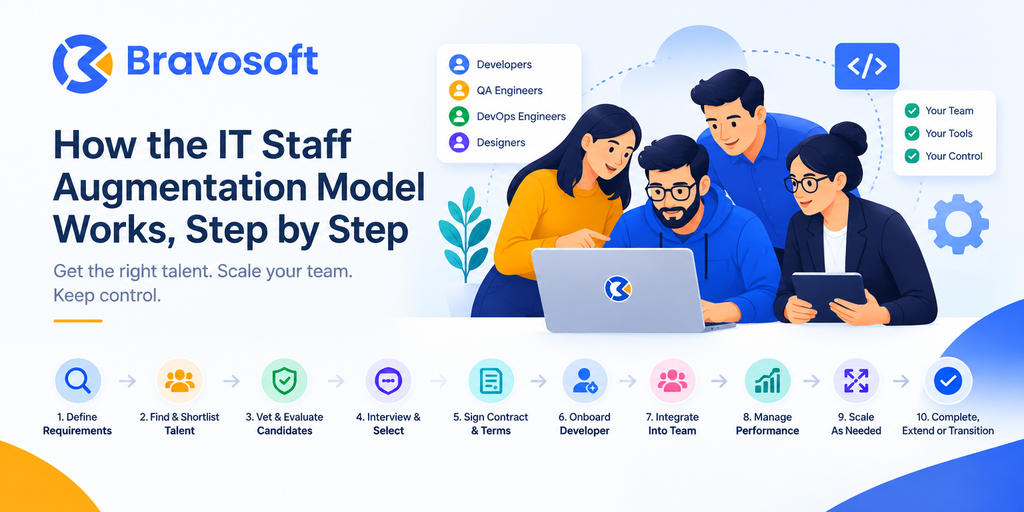
How the IT Staff Augmentation Model Works Step by Step
The process below follows the usual path of an IT staff augmentation engagement. Details vary by provider, but the stages are consistent.
Step 1: Define Your Team and Technical Requirements
The first step is to describe exactly what capacity or skill you are missing. A vague request leads to a vague match, so spend time here. A useful brief covers:
- Role: frontend developer, backend developer, mobile developer, QA engineer, DevOps engineer or designer.
- Skills and technology stack: for example React, Node.js or .NET Core, plus any tools, frameworks and cloud platforms you rely on.
- Seniority: whether you need someone who can work independently or a junior who will be guided closely.
- Team size and duration: how many people, and for roughly how long.
- Working hours and time zone: how much overlap you need with your current team.
- Responsibilities: what the person will own, such as a feature area, a test suite or a migration.
Writing down who they will report to inside your company also helps. Augmented specialists perform best when they have one clear point of contact.
Step 2: Find and Shortlist Suitable IT Professionals
Once the requirements are clear, the provider searches its talent pool for people who match the role, stack and seniority. A provider with an existing bench of engineers can often start from candidates it already knows, which shortens this stage compared with advertising a role and waiting for applications.
The result should be a focused shortlist rather than a large pile of resumes. A good provider filters on your brief before you see anyone.
Step 3: Vet and Evaluate Candidates
Vetting is where providers differ most. A thorough process normally covers four areas:
- Technical screening: a skills test or code exercise relevant to your stack.
- Experience review: the kinds of systems the person has built and shipped, and in which industries.
- Communication: how clearly the candidate explains decisions, asks questions and reports progress, which matters even more in distributed teams.
- Problem solving and team fit: how the candidate approaches ambiguity and whether their working style suits your team.
Ask the provider how it vets candidates and what happens to those who do not pass. A clear answer is a good sign.
Step 4: Interview and Select the Right Candidate
The client should have the final say. Even when the provider has vetted a candidate thoroughly, only your team knows how your codebase, culture and deadlines will shape the role.
A short technical conversation with the engineering manager or a senior developer is usually enough. Focus on how the candidate would handle a real task from your backlog, not on trivia. If the match is wrong, say so early; a good provider will propose another candidate.
Step 5: Finalize Contract and Engagement Terms
Before work begins, both sides should agree on the terms in writing. Typical points include:
- Scope of the role and expected responsibilities.
- Duration of the engagement and the notice period for ending or changing it.
- Billing model and invoicing schedule.
- Working arrangement, including hours, time zone overlap and availability.
- Confidentiality, intellectual property and data handling.
- Communication expectations and reporting.
- Replacement terms if the fit is not right, and how the team can be scaled.
Pricing varies by role, seniority, technology and provider, so request a clear written breakdown and compare what each quote includes.
Step 6: Onboard the Augmented Developer
Onboarding turns a vetted candidate into a productive team member. Treat it the way you would treat a new hire. Before the first day, prepare:
- Accounts for email, chat and video calls.
- Access to source repositories, issue trackers and project management tools, with permissions limited to what the role needs.
- Documentation on architecture, coding standards, branching rules and the deployment process.
- A walkthrough of the product, the roadmap and the current sprint.
- Your security policies, including how credentials, devices and customer data should be handled.
Granting only the access a person needs follows the principle of least privilege, a widely accepted security practice described by NIST. A simple first task, such as fixing a small bug, helps the developer learn your workflow before taking on larger work.
Step 7: Integrate the Developer Into the Existing Team
Integration is what separates an augmented team member from a freelancer working off to the side. The developer should take part in the same rhythm as everyone else:
- Daily standups to share progress and blockers.
- Sprint planning, sprint reviews and retrospectives, if you work in Agile cycles as described in the Scrum Guide.
- Code reviews, both giving and receiving. Pull request reviews on platforms such as GitHub keep quality consistent across internal and external contributors.
- Shared channels for questions, so knowledge does not stay in private messages.
This is the approach behind IT team augmentation services that focus on collaboration: the specialists join your Slack, your meetings and your processes rather than working in parallel.
Step 8: Manage Work and Performance
In staff augmentation, the client manages the daily technical work, and the provider supports the engagement. Your managers assign tasks, set priorities, review output and decide how work is done. The provider handles staffing matters such as contracts, payroll and replacement, and usually checks in on how the engagement is going.
To manage performance well:
- Set clear goals for the first 30 days and review them together.
- Measure what you measure for internal engineers: delivered work, code quality, reliability and communication.
- Give feedback early and directly, and share it with the provider if there is a problem.
- Hold regular check ins with the provider’s account contact to catch issues before they grow.
Because you own the day to day direction, the quality of your management affects the outcome as much as the quality of the developer.
Step 9: Monitor, Adjust and Scale the Team
Flexibility is one of the main reasons companies choose this model. As the project changes, you can:
- Add specialists, such as a QA engineer or a mobile developer, when a new need appears.
- Reduce team size after a project phase ends.
- Change the skill mix, for example moving from frontend to backend capacity.
- Increase capacity before a launch and scale back afterwards.
Scaling is easiest when the contract already describes how to add or remove people and how much notice is required. Review team needs at the end of each quarter or major milestone rather than waiting for a crisis.
Step 10: Complete, Extend or Transition the Engagement
Every engagement ends or changes in one of a few ways:
- Continue: keep the same team if the work is ongoing.
- Expand: add roles as the product grows.
- Reduce: keep a smaller core team for maintenance.
- Transition: hand over responsibilities to internal staff, or to newly hired engineers, with documentation and knowledge transfer.
- Conclude: end the engagement, remove access and confirm that all code and documentation remain with your company.
Plan the transition before the final week. Ask departing developers to document what they built and to walk the next owner through it. Then revoke repository, cloud and tool access on the last day.
Process Summary: The Staff Augmentation Workflow at a Glance
Business Need → Requirements → Candidate Matching → Technical Vetting → Client Interview → Contract → Onboarding → Team Integration → Ongoing Management → Scaling or Transition
In short: you define the need, the provider finds and vets people, you choose, you agree on terms, and then you onboard, integrate and manage the specialists as part of your team until the work is done or the model changes.
Example: How a SaaS Company Could Use Staff Augmentation
This is an illustrative scenario, not a real client case. A SaaS company has an internal product team of six. It plans a six month expansion that adds a customer reporting module, and needs two React developers and one QA engineer.
- Requirements: the engineering manager lists the stack (React with a Node.js backend), the need for mid to senior experience, a six month term and a four hour overlap with the home team.
- Matching and vetting: the provider proposes candidates who have passed technical screening for React and test automation.
- Interviews and contract: a senior developer interviews each candidate for 30 minutes. The company approves three people and signs an agreement covering duration, billing, confidentiality and notice terms.
- Onboarding: the three specialists receive repository access, design files and the coding guide, then fix small bugs in week one.
- Integration and management: they join standups and sprint planning, submit pull requests for review and report to the product team’s tech lead. The tech lead assigns their work, and the provider checks in monthly.
- Scaling and ending: after launch, the company reduces the team to one React developer and the QA engineer for maintenance, and documents the module for the internal team.
Every stage follows the steps above. The company never lost control of the roadmap, and it added capacity without recruiting permanent staff.
IT Staff Augmentation vs Internal Hiring vs Outsourcing
The main difference is who manages the work and owns the result. With staff augmentation, you keep control and add people. With outsourcing, a vendor takes responsibility for delivery. With internal hiring, you build permanent capability yourself.
| Factor | IT staff augmentation | Internal hiring | Outsourcing |
|---|---|---|---|
| Who manages the developers | Your team manages daily work; the provider handles staffing administration | Your team manages everything, including HR | The vendor manages its own team and delivery |
| Hiring speed | Usually faster than a full recruitment cycle, depending on the provider and role | Often the slowest, because of sourcing, interviews, notice periods and onboarding | Depends on vendor capacity and project kickoff |
| Control | High control over tasks, priorities and technical decisions | Highest control | Lower control over daily execution; you control outcomes and milestones |
| Flexibility | High; roles and skills can change as needs change | Low; roles are tied to permanent headcount | Moderate; changes usually go through scope or contract updates |
| Scalability | Team size can be increased or reduced with notice | Slow to scale up, difficult to scale down | Scales through the vendor, within the agreed scope |
| Best use case | Capacity or skill gaps inside an existing team and process | Core, long running roles that hold company knowledge | Defined projects where you want a partner to deliver the result |
| Project ownership | You own the project and the delivery risk | You own the project and the delivery risk | The vendor shares or carries delivery responsibility, based on the contract |
| Long term suitability | Works for extended engagements if you can manage the team | Best for permanent capability | Suits one off or periodic projects better than permanent capability |
No model is better in every situation. The right choice depends on project scope, your internal management capability, the skills required, your timeline and how much control you want. Many companies combine models, for example keeping core engineers internally and using augmentation for peaks.
When Is IT Staff Augmentation a Good Choice?
Staff augmentation is a good choice when you have a functioning team and process but need extra capacity or specific skills. Common situations include:
- Temporary workload increases, such as a feature push or a platform migration.
- Short term skill gaps, such as mobile or QA automation expertise.
- Specialized technology requirements that your team does not use often.
- Faster scaling after funding, a new contract or a market opportunity.
- Product development acceleration when the backlog is outpacing the team.
- MVP development support, where a small internal team needs help reaching launch. Companies at this stage may also look at dedicated MVP services if they want a partner to build the product.
- Launch preparation, when testing and bug fixing peak.
- Situations where a permanent hire does not make business sense because the need is temporary.
Is staff augmentation suitable for long term projects? Yes, if your team can manage the specialists over time. Many engagements run for many months, and some become ongoing extensions of the team. For permanent core roles, internal hiring may still be the better long term investment.
When Is IT Staff Augmentation Not the Best Option?
The model has limits. It may not fit if:
- You want an outside partner to own the whole project. Augmented developers work under your direction, so you remain responsible for delivery.
- Your internal team cannot manage additional developers. Without capacity for planning, reviews and feedback, new people may slow things down at first.
- The project has a clearly fixed scope and deliverable. A fixed price outsourcing contract can suit this better.
- You need complete project outsourcing. In that case, full software development services from a delivery partner are a closer match.
- No technical leadership exists internally. Someone must set direction, review code and make architecture decisions.
If several of these apply, consider outsourcing or a hybrid approach before you commit.
How to Choose the Right IT Staff Augmentation Provider
A provider affects how smoothly every step above runs. Use these checks when you compare options:
- Technical vetting process: ask what tests and interviews candidates complete, and request details rather than general claims.
- Technology expertise: confirm hands on experience with your exact stack, not just similar tools.
- Developer experience: ask about the seniority and background of the people you would be matched with.
- Communication and reporting: check spoken and written English or your working language, and how often the provider reviews progress with you.
- Time zone compatibility: agree on overlap hours before signing.
- Replacement policy: know what happens if a developer is not the right fit or becomes unavailable.
- Scaling flexibility: confirm how quickly and on what terms you can add or reduce people.
- Contract transparency: look for clear rates, terms and notice periods in writing.
- Security practices: ask about confidentiality agreements, device and access policies, and how data is protected.
- Relevant experience: ask for examples of similar projects or industries, and request references where possible.
Bravosoft’s IT team augmentation service, for example, states that engineers pass a technical skills test and a structured interview before working on client projects, and that matched specialists can typically join within one week of finalizing the contract. It also describes teams that work across stacks including React, Vue.js, Angular, Node.js, .NET Core, Flutter, Kotlin, Swift and Firebase, and that join the client’s own tools and meetings. You can read more about the delivery approach on the how we work page.
Whichever provider you consider, compare what each one actually commits to in the contract, not just what appears in marketing copy.
Conclusion
Understanding how the IT staff augmentation model works, step by step, makes it easier to decide whether it fits your situation. The pattern is consistent: define the need, find and vet the right people, choose together, agree on clear terms, onboard properly, integrate into your team, manage the work, and adjust or end the engagement as your roadmap changes.
The model works best for companies that already have technical direction and need more capacity or specialized skills. If that describes you, begin by writing a precise requirements brief. It is the single most useful thing you can do to get the right match.
If your team needs additional technical capacity, you can explore Bravosoft’s IT team augmentation services to see how vetted developers, designers and QA specialists could fit into your workflow.
Frequently Asked Questions:
IT staff augmentation is a model in which a company adds external developers, QA engineers or other technical specialists to its own team for a defined period. The specialists work under the client’s direction and use the client’s tools and processes.
The company defines its requirements, the provider sources and vets candidates, the company interviews and selects them, and both sides agree on contract terms. The specialists are then onboarded, integrated into the team, managed day to day by the client, and scaled or transitioned as needs change.
The client manages the daily technical work, including tasks, priorities and code review. The provider manages staffing administration such as contracts, payroll and replacement support.
It depends on the role, the stack and the provider. Starting from a clear brief shortens the process. Bravosoft states that matched specialists can typically join within one week of finalizing the contract.
Yes. That is the purpose of the model. They join standups, sprint planning, code reviews and team chats, and follow your workflow, so they operate as part of the team rather than a separate group.
Yes. Teams can usually add specialists when workload grows and reduce size when it falls. The exact process and notice period should be written in the contract.
With staff augmentation, you add people to your team and manage their work yourself. With outsourcing, a vendor takes responsibility for delivering a project or service, usually with its own management and a defined scope.
It can be, especially for startups that have technical leadership but need extra capacity or a specific skill for an MVP or launch. Startups without anyone to guide the developers may be better served by an outsourcing or product development partner.