
A sales manager opens a spreadsheet to see which leads still need a follow up call. Down the corridor, a purchasing officer checks a different file to confirm whether raw materials will arrive before a customer’s delivery date, while the accountant reconciles invoices against stock records by hand. Everyone is working hard, yet nobody is looking at the same information. This is usually the moment a business owner starts asking the right question: in the debate of ERP vs CRM software, which does your business need?
The two systems address different needs, although their functions can overlap. This guide explains both in plain language, compares them side by side, and gives you a practical framework for choosing your first investment.
Quick answer:
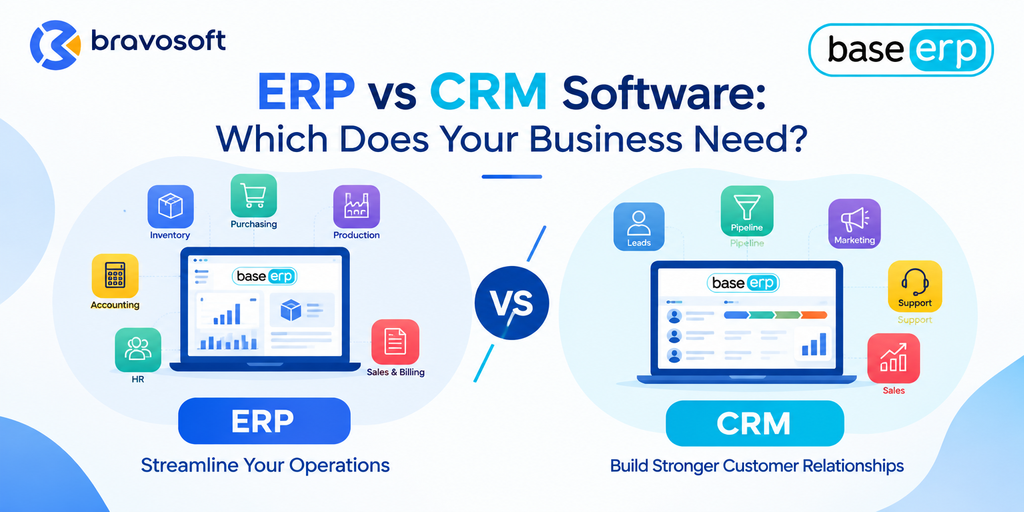
- ERP (Enterprise Resource Planning) software connects internal operations such as accounting, inventory, purchasing, and production.
- CRM (Customer Relationship Management) software organizes leads, customer interactions, and the sales pipeline.
- The right starting point depends on where your most costly bottleneck sits, and many growing businesses eventually use both.
What Is ERP Software?
Enterprise Resource Planning (ERP) software is a business management system that connects a company’s core internal processes on one shared database. IBM describes ERP as software built to manage and streamline an organization’s functions, processes, and workflows through automation and integration. Instead of each department keeping its own records, finance, purchasing, inventory, and sales work from the same data.
Depending on the product, an ERP system may include modules for:
- Accounting and financial management
- Inventory and warehouse management
- Procurement and supplier management
- Sales orders and billing
- Manufacturing and production planning
- Human resources and payroll, where applicable
- Reporting and visibility across departments
Not every ERP includes every module. Businesses typically choose the modules that match their operations, so a trading company and a manufacturer will configure the same platform very differently.
A practical example: Imagine a distributor with two warehouses. A customer places a large order, and the sales team promises delivery in five days. In an ERP system, the order checks stock across both locations, triggers a purchase request if inventory is short, and posts the invoice to accounting once goods ship. Without it, someone has to call the warehouses, email the supplier, and re enter the same order into the accounting file.
What Is CRM Software?
Customer Relationship Management (CRM) software manages how a business interacts with current and potential customers. According to IBM, CRM centralizes customer data such as contact details, orders, and communication records so teams can deliver more consistent and personalized service. Its main purpose is to help sales, marketing, and support teams win and keep customers.
Common CRM capabilities include:
- Lead and contact management
- Sales pipeline tracking
- Customer communication history
- Follow up reminders and task management
- Sales forecasting
- Marketing campaign management, where supported
- Customer service and case handling
CRM functionality varies widely by product. Some tools focus only on sales tracking, while others add marketing automation and support ticketing. Always confirm what a specific product includes.
A practical example: A company selling office equipment has five sales representatives. Before CRM, leads lived in personal notebooks and chat messages, so follow ups were missed whenever someone was busy or on leave. With a CRM, every lead has an owner, a stage, a next action, and a history of conversations. The sales manager can see which deals are stalled and which are close to closing.
ERP vs CRM Software: Key Differences
In simple terms, ERP generally focuses on internal business operations and resource management, while CRM primarily focuses on customer relationships, sales, and related customer facing processes. SAP uses a restaurant analogy: ERP is the kitchen and supply chain behind the scenes, while CRM is the dining room where customers are served.
| Area | ERP software | CRM software |
|---|---|---|
| Primary purpose | Manage and connect internal operations and resources | Manage customer relationships, sales activity, and engagement |
| Main business users | Finance, operations, purchasing, warehouse, production, HR | Sales, marketing, customer support, account managers |
| Core processes | Procure to pay, order to cash, production planning, inventory control, financial close | Lead capture, opportunity tracking, follow ups, campaigns, support cases |
| Types of data managed | Financial records, stock levels, supplier data, production and order data | Contacts, leads, deals, communication history, customer preferences |
| Typical modules | Accounting, inventory, procurement, manufacturing, sales and purchase, HR | Contact management, pipeline, forecasting, marketing tools, service desk |
| Reporting and analytics | Profitability, cost, stock valuation, cash flow, operational performance | Conversion rates, pipeline value, response times, campaign results, retention |
| Business problems solved | Disconnected data, stock errors, manual reconciliation, slow reporting | Lost leads, missed follow ups, unclear pipeline, scattered customer information |
| Common implementation priorities | Process mapping, data migration, module configuration, user training across departments | Pipeline design, contact data import, email and channel integration, sales team adoption |
| Examples of measurable outcomes to track | Stock accuracy, order cycle time, time to close the books, purchasing lead times | Lead response time, conversion rate, pipeline coverage, repeat customer rate |
The categories are not completely separate in every product. SAP notes that some ERP offerings include CRM features, while a dedicated CRM generally does not handle functions such as invoicing or order history without being connected to an ERP. Treat the table as a guide to each category’s center of gravity, not a strict boundary.
ERP vs CRM: Real World Business Examples
These illustrative scenarios show how the answer changes with the business problem.
Scenario 1: A manufacturer managing materials, production, and delivery
A furniture manufacturer buys timber and hardware, runs several production orders at once, and promises delivery dates to dealers., and finance cannot tell which products are truly profitable. Immediate priority: ERP. The core problem sits in raw materials, production, inventory, costing, and delivery commitments, all of which depend on connected operational data.
Scenario 2: A sales led company that cannot see its pipeline
A software reseller has a capable team, but leads arrive from calls, email, and social media with no shared record. Follow ups are inconsistent, and the owner cannot forecast next month’s sales. Operations are simple, with little inventory. Immediate priority: CRM. The costly problem is lost opportunities and poor visibility in the sales process.
Scenario 3: A growing business with both problems
A growing trading company has branch stock mismatches and slow invoicing, and its sales team also loses track of quotations. Both systems matter, but they rarely need to launch on the same day. Immediate priority: whichever bottleneck costs more. If wrong stock and delayed billing are hurting cash flow, begin with ERP. If missed deals are the bigger loss, begin with CRM. Either way, choose tools that can connect later, or consider a platform where ERP and CRM modules work together.
When Should Your Business Choose ERP?
ERP is usually the stronger priority when the biggest pain sits behind the scenes. Watch for these signals:
- Inventory discrepancies across departments or branches, which lead to stockouts, overstocking, and unreliable delivery promises.
- Disconnected accounting, purchasing, and sales data, which forces teams to question whose numbers are correct.
- Manual reconciliation between spreadsheets and separate tools, which consumes time and invites errors.
- Poor visibility into costs and profitability, which makes pricing and budgeting decisions harder.
- Production planning difficulties, such as unclear material needs or missed schedules.
- Delayed operational reports, which means managers act on last month’s picture.
- Difficulty coordinating orders and deliveries across sales, warehouse, and finance.
An integrated ERP system addresses these issues by letting departments work from the same records, so a sale, a stock movement, and an invoice all update one connected set of data. SAP states that this single shared database is the biggest advantage of ERP. Results depend on configuration and adoption, so no vendor can honestly promise a specific return.
When Should Your Business Choose CRM?
CRM is often the better first investment when revenue depends on how well you capture and nurture opportunities. Consider CRM if you see:
- Lost leads and inconsistent follow ups, especially when enquiries arrive through several channels.
- Limited visibility into the sales pipeline, so forecasts rely on guesswork.
- Customer information scattered across spreadsheets, inboxes, and messaging apps.
- Difficulty tracking sales opportunities from first contact to closed deal.
- Inconsistent customer communication, where different staff give different answers.
- Limited insight into sales team performance, such as who follows up fastest or which stage loses the most deals.
There is real value in organizing customer facing processes before investing in broader operational software. According to SAP, CRM is generally less costly and quicker to implement than ERP, which is one reason smaller teams often start there. That is a pattern, not a rule, and your own bottleneck should lead the decision.
Do You Need ERP and CRM Together?
Many growing businesses eventually do. CRM manages leads, prospects, customer interactions, and sales opportunities. ERP manages order fulfillment, inventory, procurement, accounting, and other operational processes. A simple end to end flow looks like this:
Lead → Sales Opportunity → Confirmed Order → Inventory or Production Check → Fulfillment → Invoice → Financial Reporting
How smoothly this flow works depends on the capabilities and integration of the systems you select. IBM explains that when the systems are integrated, a sales order created in CRM can trigger inventory checks, production planning, and invoicing in ERP, which reduces duplicate data entry and shortens the order to cash cycle.
The benefits of integration include:
- Less duplicate data entry and fewer transcription errors
- Better information sharing between sales, operations, and finance
- Improved visibility, such as sales staff seeing stock availability before they promise delivery
- More consistent customer service, because everyone sees the same customer and order history
Integration is not automatic, though. Buying two systems does not create a connected business. SAP lists data compatibility, data migration, configuration complexity, and user adoption as common hurdles. Integration quality, data consistency, process design, and training matter as much as the software itself.
There are two common routes. You can connect a dedicated CRM to a separate ERP, or choose a platform that offers both in one place. For example, ERP software for integrated business management such as BASE ERP lists sales, inventory, accounting, and CRM modules within the same platform.
ERP vs CRM: A Practical Decision Making Framework
Start with your business problem, not a software trend. Use this table to map common challenges to a likely first step.
| Your main challenge | Likely first step | Why |
|---|---|---|
| Stock counts differ between branches and the books | ERP | Inventory and accounting need one shared record |
| Leads go cold because nobody follows up | CRM | The problem sits in tracking and reminders |
| Finance rebuilds reports from several files each month | ERP | Operational and financial data need to connect |
| Management cannot forecast sales or see pipeline stages | CRM | Pipeline visibility is a CRM strength |
| Production plans keep missing material availability | ERP | Planning depends on procurement and inventory data |
| Sales promise delivery dates that operations cannot meet | Both, connected | Sales needs live stock and order data from operations |
| Customer details are scattered across personal files | CRM | A central customer record fixes this first |
| Quotes, orders, invoices, and stock are all handled manually | ERP, with CRM as needed | Order to cash needs a connected backbone |
Before you decide, evaluate these factors honestly:
- Most costly bottleneck: Where do errors, delays, or lost revenue hurt most today?
- Existing software: What do you already own, and can it be extended or connected?
- Process maturity: Are your workflows clear enough to be automated?
- Integration requirements: Which systems must share data, and how often?
- Budget: Include implementation, migration, training, and support.
- Scalability: Will the system handle more users, branches, and products as you grow?
- Implementation capacity: Do you have people with time to lead the project and train the team?
Common Mistakes When Choosing ERP or CRM
Choosing software based only on price. A low license fee can hide costly customization, weak support, or missing features. Compare total cost over several years.
Buying features without identifying business requirements. A long feature list is not a strategy. List your top problems, then test products against that list.
Assuming ERP and CRM are interchangeable. They overlap in places but serve different centers of gravity. SAP says cloud ERP generally cannot replace a dedicated CRM, because their focus differs.
Ignoring integration requirements. Ask how data moves between systems and who maintains the connection, and request a demo using one of your own orders from quote to invoice.
Overlooking data migration and data quality. Duplicate contacts and messy item lists carry straight into the new system. Audit and clean your data before migration, and assign someone to own data standards afterward.
Failing to train employees. Software that people avoid delivers nothing. Plan role based training and follow up support after launch.
Automating inefficient processes without reviewing them first. Automation can make a poor process faster, not better. Map your current workflow, remove unnecessary steps, and then configure the system.
Expecting immediate results without implementation planning. SAP notes that ERP implementation can take months or even years depending on size and complexity. Set phased milestones and start with the highest priority processes.
Conclusion: Start With the Problem, Not the Software
ERP and CRM are not rivals. ERP keeps the internal engine of your business connected, and CRM keeps your customer relationships organized. The right first step comes from an honest look at where your business loses the most time, money, or opportunity.
If your challenges point toward disconnected inventory, accounting, purchasing, and production, it may be worth reviewing ERP software for managing business operations and how a connected platform could fit your workflow. Understand your requirements first, then evaluate the options that match them.
Frequently Asked Questions
The main difference is focus. ERP manages internal operations such as finance, inventory, purchasing, and production, while CRM manages customer relationships, leads, and sales activity. One organizes how the business runs, and the other organizes how the business engages customers.
Neither is universally better. ERP is more valuable when operational and financial data are fragmented, and CRM is more valuable when sales and customer management are the weak point. The better choice is the one that addresses your most costly bottleneck.
Sometimes partly, but not always fully. Some ERP platforms include CRM modules that cover basic lead and customer tracking. Businesses with complex sales processes or large customer bases may still need a dedicated CRM, so compare the actual capabilities of the product.
No, not in most cases. CRM tools do not typically handle accounting, inventory, procurement, or production planning. SAP notes that even strong CRM software generally does not manage invoices or order history without integration with an ERP.
It depends on the problem, not the size. A small business struggling with leads and follow ups often benefits from CRM first. One struggling with stock, billing, and reporting often benefits from ERP first.
Yes. Many platforms offer built in connections, and others connect through standard integrations or middleware. Order, stock, and invoice data can then flow between sales and operations, though this needs careful planning.
Implement first the system that solves your most costly problem. If revenue is leaking through lost leads and poor follow up, start with CRM. If stock errors, delayed billing, or weak cost visibility are the larger issue, start with ERP. Plan for integration from the beginning.
Accounting software focuses on financial records such as ledgers, payables, and receivables. CRM focuses on customers and sales. ERP is broader: according to IBM, accounting is only one module within an ERP system, which also covers areas such as procurement, inventory, and manufacturing.