
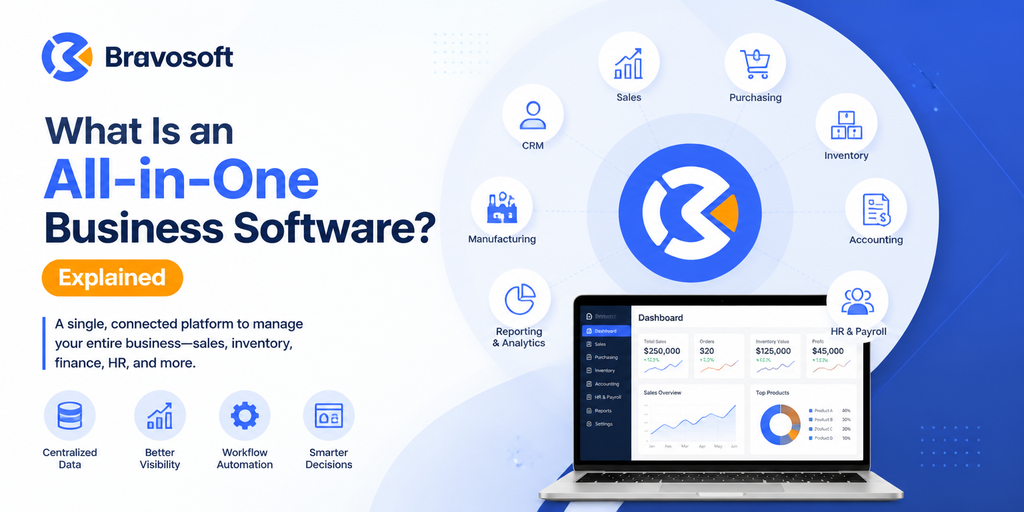
An all-in-one business software is a single digital platform that combines multiple core business functions, such as sales, inventory, accounting, human resources, and manufacturing, into one connected system instead of requiring separate, disconnected tools for each task. Instead of switching between different applications and manually transferring information, employees work from one shared system where data updates automatically across departments.
Many growing businesses start out using separate software for accounting, a different tool for inventory, a spreadsheet for HR records, and yet another system for sales tracking. As the business expands, this patchwork of tools often leads to duplicated data entry, inconsistent records, and delays in getting an accurate picture of overall performance. All-in-one business software is designed to reduce this problem by bringing these functions under one connected system.
What Is an All-in-One Business Software?
An all-in-one business software is a unified platform that manages several core business operations, such as sales, purchasing, inventory, finance, and human resources, from a single system with a shared database. Rather than relying on separate applications for each task, teams work within one connected environment where information updates in real time.
The term “all-in-one” does not necessarily mean the software includes every possible business function. Coverage varies by provider, and businesses should confirm which specific functions are included before assuming a platform covers everything. What defines an all-in-one system is that the functions it does include are built to work together on shared data, rather than being installed side by side as separate applications. When a sales order is created, for example, it can automatically affect inventory counts, and the resulting invoice can flow into the accounting records without anyone re-entering the figures manually. This is why the term is often used interchangeably with business management software or an integrated business management system.
How Does All-in-One Business Software Work?
Most all-in-one business software is built around a central database that every functional area, often called a module, draws from and writes to. When someone on the sales team logs a new order, that transaction is stored once and becomes instantly visible to the finance team preparing an invoice, the warehouse team checking stock levels, and management reviewing performance dashboards.
This differs from disconnected software, where each tool keeps its own separate records and someone has to manually copy, export, or reconcile data between systems. Because everything sits within one system, all-in-one business software supports business process automation: an action in one department can automatically trigger an update or task in another. A purchase order approval, for instance, can update inventory forecasts and notify the finance department at the same time, without a separate manual step.
Access within the platform is usually controlled through user roles and permissions, so employees only see the information relevant to their responsibilities, while managers and executives can view centralized business data across the whole organization through dashboards and consolidated reports.
What Does All-in-One Business Software Include?
The exact modules included in an all-in-one business software vary from provider to provider, and not every platform offers every function. Common areas covered by these systems include:
- Sales management: recording quotations, sales orders, and customer transactions
- Purchasing: managing supplier orders, purchase requests, and vendor records
- Inventory management: tracking stock levels, warehouse locations, and movement of goods
- Accounting and finance: handling invoicing, expenses, ledgers, and financial reporting
- Human resources and payroll: managing employee records, attendance, and salary processing
- Manufacturing and production: planning production schedules, tracking materials, and monitoring work orders
- Customer relationship management (CRM): tracking leads, customer interactions, and follow-ups
- Supply chain management: coordinating procurement, logistics, and supplier relationships
- Reporting and analytics: generating business reports and performance dashboards
- Asset management: tracking company assets, maintenance schedules, and depreciation
- Business dashboards: providing a real time overview of key metrics across departments
Because feature sets differ, businesses evaluating a platform should confirm which specific modules are included and which, if any, need to be purchased separately or configured for their industry.
All-in-One Business Software vs. Standalone Software
The main difference between all-in-one business software and standalone software lies in how data is stored and shared. All-in-one platforms keep information in a single connected database, while standalone tools each maintain their own separate records that typically need to be manually synced or exported between systems.
| Aspect | All-in-One Business Software | Standalone Software |
| Data storage | Centralized, shared database across departments | Separate database for each individual tool |
| Data entry | Entered once and reused across connected modules | Often re-entered manually in each separate tool |
| Reporting | Combined reports drawing on data from multiple departments | Reports limited to the scope of each individual tool |
| Integration | Built-in, native connections between functions | Requires manual work or third-party connectors to integrate |
| Setup and cost | Typically higher upfront investment | Lower individual cost, though multiple tools can add up over time |
| Best suited for | Businesses managing multiple departments or locations | Very small businesses with simple, single-function needs |
Standalone software can still work well for very small businesses with simple needs, such as a sole proprietor using a single accounting tool. However, as the number of departments, transactions, and employees grows, disconnected tools tend to create more manual work and a higher risk of inconsistent records across the business.
Is All-in-One Business Software the Same as ERP?
All-in-one business software and enterprise resource planning (ERP) software overlap significantly, but the two terms are not always identical. “All-in-one business software” is a broader, more general description of any platform that combines multiple business functions, while ERP specifically refers to structured systems designed to plan and manage resources across an entire organization.
In practice, many all-in-one business software platforms are, in fact, ERP systems, particularly when they include modules for manufacturing, supply chain, and financial planning. However, some all-in-one tools marketed to smaller businesses may offer a lighter combination of functions, such as invoicing and CRM, without the full depth typically associated with a dedicated ERP software. Oracle’s overview of ERP systems similarly describes ERP as software that connects business processes and enables the flow of data between them, which aligns closely with how all-in-one business software is designed to operate.
In short, most ERP software can be considered a form of all-in-one business software, but not every all-in-one platform is built to the same depth or structure as a traditional integrated ERP system.
Benefits of All-in-One Business Software
When implemented well, an all-in-one business software platform can create meaningful operational improvements across a business. Key benefits include:
- Centralized data: all information lives in one place, so employees across departments work from the same records instead of conflicting spreadsheets or files
- Reduced data duplication: since data is entered once and shared across modules, teams spend less time re-entering the same information in multiple systems
- Better cross-department visibility: managers can see how sales, inventory, and finance connect to one another, which helps identify bottlenecks earlier
- Improved reporting: reports draw from live, unified data, which tends to be more accurate than combining exports from separate tools
- Workflow automation: routine tasks, such as updating stock levels after a sale, happen automatically rather than requiring a manual step
- Better collaboration: teams can see relevant information from other departments without waiting for emails or manual reports
- Reduced manual work: employees spend less time on repetitive administrative tasks, such as copying data between systems
- Improved operational control: leadership gains a clearer, real time picture of what is happening across the business
- Easier business monitoring: dashboards and centralized reports make it simpler to track performance against goals
- Scalability: as a business adds departments, locations, or employees, a well built all-in-one platform can typically expand with it rather than requiring an entirely new system
Potential Challenges of All-in-One Business Software
While all-in-one business software offers clear advantages, it is not without trade offs. Businesses considering this type of platform should be aware of the following:
- Implementation complexity: setting up a system that touches multiple departments takes more planning than installing a single tool
- Learning curve: employees accustomed to older tools or manual processes may need time and training to adapt
- Upfront investment: all-in-one platforms often involve a higher initial cost than a single standalone tool, even if it becomes more cost effective over time
- Customization requirements: some businesses need industry specific workflows that require configuration or custom development
- Data migration: moving existing records from old systems or spreadsheets into a new platform can be time consuming and requires careful data cleaning
- Employee adoption: successful implementation depends on staff actually using the new system consistently, which requires change management and internal buy-in
- Dependence on the software provider: businesses rely on the vendor for updates, support, and long term reliability, so vendor reputation matters
- Overpaying for unnecessary features: some platforms bundle modules a business does not need, so it is important to evaluate actual requirements rather than paying for unused functionality
This is why evaluating an all-in-one platform honestly, including its limitations, is as important as reviewing its features.
Who Should Use All-in-One Business Software?
All-in-one business software tends to bring the most value to organizations that manage more than one core business function and need those functions to work together. This commonly includes:
- Growing businesses that have outgrown spreadsheets and basic standalone tools
- Manufacturing companies that need to connect production planning with inventory and finance
- Furniture businesses managing custom orders, raw materials, and production timelines
- Retail businesses tracking sales, inventory, and customer data across one or more locations
- Trading and distribution businesses coordinating purchasing, stock, and sales
- Multi-department organizations where sales, finance, HR, and operations need shared visibility
- Businesses operating across multiple branches or locations
- Businesses currently struggling with disconnected systems and inconsistent records
Small businesses with very simple, single-function needs may not require a full all-in-one platform right away, but many eventually adopt one as their operations and transaction volumes expand.
Signs Your Business May Need All-in-One Business Software
Certain operational patterns tend to indicate that a business has outgrown its current mix of tools. Common signs include:
- Your teams rely on too many disconnected tools that do not communicate with each other.
- Different departments maintain separate records for the same customers, products, or transactions.
- Preparing management reports takes days because data must be manually gathered from multiple sources.
- Inventory figures are often inaccurate or inconsistent between systems.
- Management lacks real time visibility into sales, stock, or financial performance.
- Employees repeatedly enter the same information into multiple systems.
- Core business processes still rely heavily on spreadsheets that are prone to errors.
- Your business is expanding into new departments, product lines, or locations, and existing tools cannot keep up.
How to Choose the Right All-in-One Business Software
Selecting the right platform depends less on which software has the longest feature list and more on how well it fits actual business requirements. Consider the following before making a decision:
- Business requirements: identify which functions actually need to be connected, rather than choosing software based on features alone
- Required modules: confirm the platform includes the specific modules your business needs, such as manufacturing, CRM, or HR
- Industry fit: some platforms are built with particular industries in mind, such as manufacturing or retail, and may offer more relevant workflows
- Scalability: consider whether the software can support future growth in transactions, users, or locations
- Integration capabilities: check whether the platform can connect with any existing tools you plan to keep using
- Security: review how the provider protects business data, including access controls and backup practices
- Reporting: evaluate whether the reporting and dashboard features match the level of detail your business needs
- User experience: a platform that is difficult to navigate can slow adoption, regardless of how capable it is
- Implementation support: ask what support is provided during setup, data migration, and configuration
- Training: confirm what training resources are available to help employees adjust to the new system
- Customization: determine whether the platform can be adjusted to match your specific workflows, and whether that requires additional software development support
- Total cost of ownership: look beyond the initial price to include implementation, training, and ongoing support costs
- Vendor reliability: research how long the provider has been operating and how they support customers after implementation
BASE ERP as an Example of Integrated Business Management Software
One example of an all-in-one business management platform is BASE ERP, developed by Bravosoft. BASE ERP is a web based ERP system designed to connect core business functions, including sales, inventory, manufacturing, accounting, human resource management, supply chain, CRM, and asset management, within a single connected platform.
BASE ERP is particularly relevant for manufacturing and furniture businesses that need to manage production planning alongside inventory and financial data, though the platform is also used across other business sectors that require integrated operations. Businesses exploring BASE ERP can review its specific modules and capabilities to determine whether it matches their operational requirements.
As with any all-in-one platform, businesses considering Bravosoft’s BASE ERP should evaluate it against the same criteria discussed earlier in this article, including required modules, industry fit, and implementation support, to confirm it is the right match for their operations. Bravosoft also offers a broader range of software products and, for businesses already working within the Odoo framework, Odoo based ERP services as an alternative implementation path.
Frequently Asked Questions
An all-in-one business software is a single platform that combines multiple core business functions, such as sales, inventory, accounting, and human resources, into one connected system with a shared database, instead of requiring separate tools for each function.
All-in-one business software is a broad, general term for any platform that combines multiple business functions. ERP specifically refers to structured enterprise resource planning systems built to manage resources across an organization. Most ERP software qualifies as all-in-one business software, but not every all-in-one tool is built to full ERP depth.
Common benefits include centralized data, reduced data duplication, better cross-department visibility, improved reporting, workflow automation, reduced manual work, and easier business monitoring through unified dashboards.
It can be, particularly once a small business manages more than one core function and starts experiencing disconnected records or repeated data entry. Very small businesses with simple, single-function needs may not require a full platform right away.
Yes. Accounting and finance, along with inventory management, are among the most common modules included in all-in-one business software, since these functions frequently need to share data, such as when a sale affects both stock levels and financial records.
It improves operations by keeping data in one connected system rather than scattered across separate tools, which reduces manual re-entry, improves the accuracy of reports, and gives management a clearer, real time view of the business.
Businesses should consider their actual functional requirements, whether the platform’s modules match their industry, scalability, security, reporting capabilities, implementation support, training, and total cost of ownership rather than the initial price alone.
Understanding what is an all-in-one business software comes down to recognizing how it brings previously separate business functions into one connected system built on shared data. For businesses juggling multiple disconnected tools, evaluating an integrated platform, such as an ERP system like BASE ERP, can be a practical step toward more accurate records and smoother day to day operations.